

Let’s Settle This Debate Once and For All
This is something no one talks about. If you’re starting a new project, you need a virtual machine, and you open Google.
Within five minutes you’ve got almost 15 tabs open, half saying VMware is the king, the other half swearing VirtualBox is all you’ll ever need.
While Reddit threads are on from 2019, YouTube tutorials contradict each other.
So which one’s actually better? Honestly, it depends on what you’re trying to do. But the bigger picture here matters more than the surface-level comparison. This is where things get genuinely interesting.
Like we always say, “when talent meets opportunity, success happens.” So, always be ready to grab the opportunity as soon as it appears – and it’s going to appear now, soon.
The global virtualization software market hit USD 12.7 billion in 2025 and is projected to climb to USD 20.3 billion by 2034, growing at a 7% CAGR, as per Intel Market Research. On top of that, virtualization is reportedly cutting IT operational costs by around 40% on average while pushing system utilization above 80%. That’s not pocket change. That’s why every serious IT professional today is expected to know their way around at least one virtualization platform and ideally both.
Let’s break it down properly.
First, A Quick Reality Check: What Are These Things?
Before diving into this whole VMware vs VirtualBox thing, let’s just sort out the basics real quick.
So, VMware. These guys have been around since 1998 — that’s almost three decades of doing this. They’re not some side project either, they’re a proper enterprise company with a pretty huge product range.
- You get VMware Workstation for your desktop,
- ESXi if you are dealing with servers,
- You have vSphere for data center stuff, and a bunch of other things too.
But when someone just says “VMware” in a regular conversation, they’re mostly talking about Workstation Pro or Workstation Player.
VirtualBox has had a more interesting journey, honestly. It is free, open-source and has caught the attention for a while now. This started at a company called Innotek, then Sun Microsystems bought it, and now it’s Oracle that’s keeping its lights on. It doesn’t ask much from your system, runs on pretty much any OS you can think of, and has this really loyal crowd around it — students learning the ropes, devs testing stuff, people who just like messing around with things on weekends.
At the surface level, both of them do the same job. Run multiple operating systems on one machine, create virtual machines, all that. But the way they actually go about it, and how well they pull it off. That’s really where this whole comparison starts getting interesting.
The Core VMware vs VirtualBox Differences (Without the Jargon)
Let me lay out the actual differences in a way that doesn’t make your eyes glaze over.
- Pricing. VirtualBox is free. Completely. VMware Workstation Pro used to be paid, but VMware made it free for personal use in 2024, but the commercial licenses still require a subscription.
- Performance. VMware generally runs faster, especially with heavier workloads. VirtualBox holds its own for casual stuff but starts to feel the strain when you push it.
- 3D graphics and gaming. VMware’s 3D acceleration is just better. If you’re testing graphics-heavy apps or running games in a VM, VMware wins comfortably.
- Snapshots and cloning. Both have it. VMware’s implementation is smoother and more reliable, especially when you’ve got chained snapshots.
- Hardware compatibility. VMware supports a wider range of guest operating systems and devices, particularly USB 3.x passthrough and advanced networking.
- Ease of use. VirtualBox is genuinely friendlier for beginners. The UI is simpler, less intimidating, and won’t overwhelm you on day one.
Where VirtualBox Genuinely Shines
Don’t write VirtualBox off just because VMware is the enterprise favourite. There are real reasons it’s still wildly popular.
- It’s free for everything. Personal, commercial, educational — doesn’t matter. No license headaches.
- Cross-platform like nothing else. Runs on Windows, macOS, Linux, even Solaris. Smooth experience across all of them.
- Open source. You can peek under the hood, contribute, modify. Big plus for developer communities.
- Lightweight on resources. Won’t bring an older laptop to its knees just trying to spin up a small VM.
- Massive community. Years of forum posts, tutorials, and fixes for pretty much any issue you’ll run into.
If you’re a student learning Linux, a developer testing something locally, or a hobbyist running an old Windows XP install for nostalgia — VirtualBox does the job beautifully.
Where VMware Pulls Ahead
Now for the other side. There’s a reason VMware dominates enterprise data centers worldwide.
- Performance at scale. When you start running multiple VMs, heavy workloads, or anything resource-intensive, VMware just handles it better.
- Better hardware integration. USB passthrough, advanced networking, Direct3D acceleration — VMware does these noticeably cleaner.
- Enterprise-grade features. Snapshots, cloning, VM encryption, and integration with vSphere and other VMware products.
- AI and cloud readiness. VMware’s stack is built for virtualized cloud environments and modern AI workloads on virtual machines, which honestly puts it in a different league.
- Professional support. Paid plans come with proper enterprise support — something serious businesses can’t really skip.
Build a strong foundation in virtualization, cloud, and infrastructure management with VMware Training.VMware is where the real money and real jobs live.
The Hypervisor Story: Type 1 vs Type 2
Here’s something that gets glossed over in most hypervisor comparison articles, but it actually matters.
VirtualBox is strictly a Type 2 hypervisor. It sits on top of your host OS just like any other app you install. VMware Workstation is also Type 2, but there’s a difference.
VMware has a much wider lineup that includes ESXi, which is a Type 1 hypervisor. This runs directly on the hardware with no host OS in between. And trust me, that’s a huge deal once you start talking about server-side virtualization.
Type 1 hypervisors are what actually run the heavy stuff — data centers, cloud platforms, enterprise infrastructure. Type 2 ones? They’re perfect for desktops and dev environments where you’re just trying to get things done locally.
Knowing the difference and knowing how to work with both is exactly what separates a casual user from a paid virtualization professional.
Performance, Honestly Compared
Let’s talk numbers and real-world feelings.
- Boot times. VMware boots VMs faster, sometimes noticeably so on Windows guests.
- CPU and RAM efficiency. VMware just knows how to handle resources better. The moment you start running 3-4 VMs at once and things start getting busy, you’ll see the difference clearly.
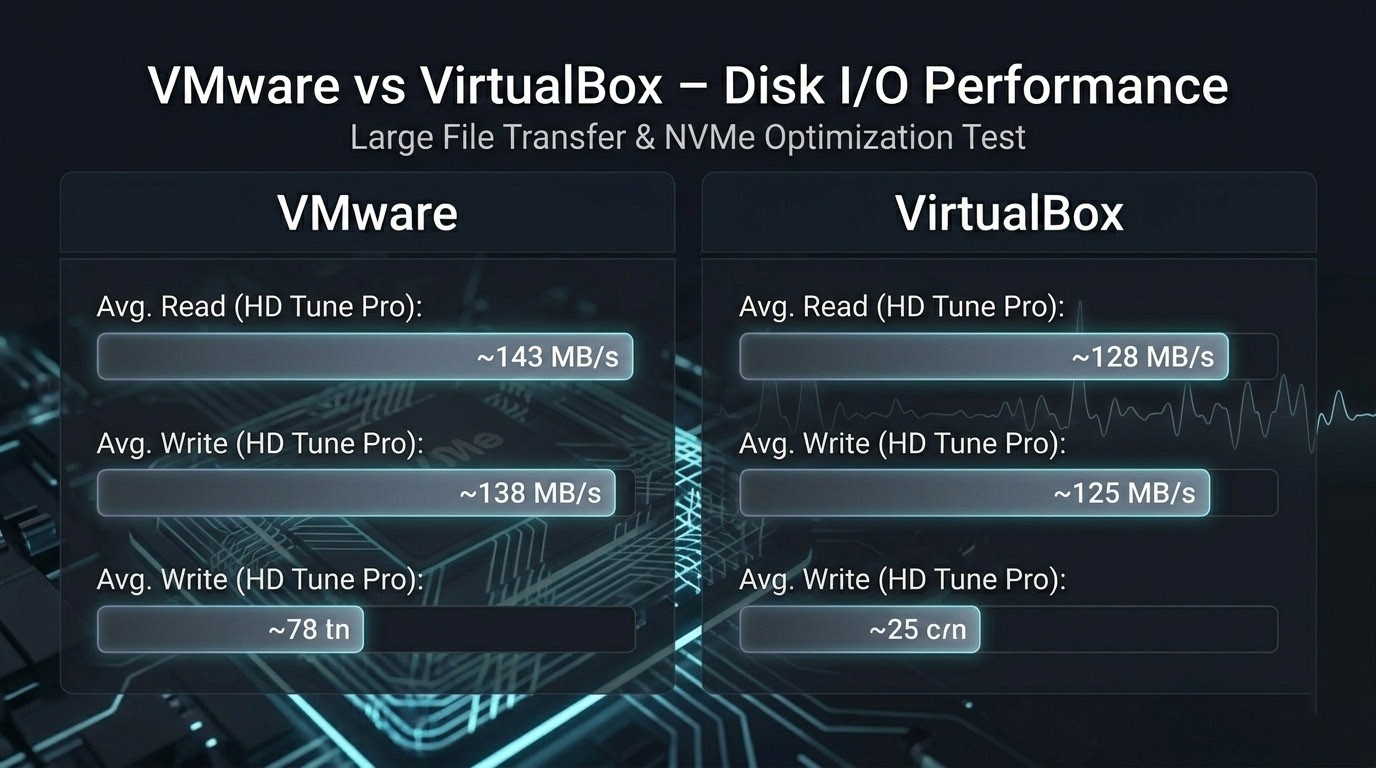
- Disk I/O. Push them under real load and VMware’s virtual disks (VMDK) usually pull a bit ahead of VirtualBox’s VDI format. Nothing dramatic, but yeah, noticeable enough.
- Networking. VMware’s virtual networking is just sturdier, plain and simple. It deals with the messier stuff — NAT, bridged, host-only configs — way more cleanly.
- GPU passthrough. Doing ML work or testing anything graphics-heavy? VMware honestly takes this one without breaking a sweat.
For regular day-to-day stuff, you probably won’t feel the difference at all. But the second you start doing anything serious, yeah, you’ll feel it pretty fast.
The AI and Cloud Angle You Really Can’t Skip Anymore
Okay, this is where things actually get fun in 2026.
Virtualization isn’t just about running a Windows VM on your Mac for kicks anymore. It’s literally the thing holding up modern AI infrastructure, cloud computing, and entire DevOps pipelines these days. And VMware? They’ve gone and planted their flag smack in the middle of all of it.
- AI workloads on virtual machines. Modern AI training and inference often happens on VMs with GPU passthrough. VMware’s tooling for this is way ahead.
- Virtualized cloud environments. VMware Cloud, VMware on AWS, on Azure, on GCP — the integration is everywhere.
- Intelligent resource management. The recent virtualization platforms are aligning completely to AI-driven optimization, thereby automatically right-sizing configurations and improving efficiency.
- Virtualization for AI applications. Containerization, hybrid cloud, and AI inference workloads all rely on solid virtualization layers underneath.
VirtualBox simply isn’t built for any of this at the enterprise level. It’s not its purpose. So if your career’s heading anywhere close to cloud, AI, or modern infra stuff, VMware is honestly the one worth putting your time into.
So Which One Should You Actually Go With?
To be honest, it is not a straightforward choice. It just comes down to what you’re actually trying to pull off.
- Go with VirtualBox if you are a student, just playing around for some fun gigs or are a developer doing some quick local testing. You can also be someone who needs a free, simple way to work with another OS every now and then.
- Go with VMware Workstation if you are serious about an IT career or are dealing with the heavier kind of workloads of doing real professional dev work. You might also be thinking of getting into enterprise virtualization at some point.
- Go with both if: You really want to get virtualization properly, you know, actually understand it, and not box yourself in with just one tool. Most experienced IT folks have used both at some point.
For learning purposes, starting with VirtualBox and then moving to VMware Workstation is honestly a pretty solid path.
The Career Angle Nobody Tells You About
Here’s the part that actually matters if you’re thinking long-term.
VMware skills aren’t just useful; they’re in serious demand. The desktop virtualization market alone is projected to grow from USD 12.3 billion in 2022 to USD 20.1 billion by 2027, i.e. at a 10.3% CAGR, according to the MarketsandMarkets data.
Also, Gartner forecasts DaaS spending alone will jump from USD 4.3 billion in 2025 to USD 6 billion by 2029.
That’s a lot of growth. And growth means jobs. And jobs mean money.
- Salary premium. VMware-certified pros consistently earn 20–35% more than IT generalists.
- Global demand. VMware skills are needed everywhere — U.S., Europe, India, APAC, Middle East.
- Industry-wide use. Banking, healthcare, government, telecom — every serious organization runs VMware somewhere.
- Career stability. Even with the rise of containers and cloud-native, VMware remains foundational to enterprise infrastructure.
- Path to bigger things. VMware skills open doors to cloud, DevOps, SRE, and AI infrastructure roles.
If you’ve been wondering whether VMware Training is worth the time and money — the data really does answer that question for you.
What Good VMware Training Should Cover
If you’re going to invest in learning this properly, here’s what a serious program should include.
- Virtualization fundamentals. Hypervisors, virtual hardware, networking basics — the actual concepts, not just button-clicking.
- VMware Workstation hands-on. Creating, configuring, and managing VMs from scratch.
- vSphere and ESXi. The enterprise side of things, including server virtualization.
- Storage and networking. vSAN, vSwitches, distributed switches, the whole networking story.
- High availability and DRS. Keeping things running when stuff breaks.
- Backup and disaster recovery. Because this matters more than people realize.
- Cloud integration. VMware on AWS, Azure, and hybrid cloud setups.
- AI and modern workloads. GPU passthrough, container support, modern infrastructure patterns.
Skip any of these and you’re getting half a course.
So, Is It Worth Doing?
Look, if your career is anywhere near IT, cloud, or infrastructure, the answer’s pretty obvious.
VirtualBox will teach you the basics. It’s a fine starting point and free as can be. But VMware is what runs the enterprise world, and that’s where the real opportunities live. Learning VMware properly puts you in the same conversation as cloud engineers, DevOps pros, and AI infrastructure folks — because they all touch virtualization in some form.
You don’t want to be the IT person in 2028 who only knows how to spin up a VirtualBox VM while everyone else is managing virtualized cloud environments and supporting AI workloads on virtual machines.
The market is growing. The demand is loud. Salaries are climbing. The platforms aren’t going anywhere. Whether you do something about it now is honestly the only thing left to figure out.
Quick FAQ
Is VirtualBox really enough to learn on? For the basics, yeah, totally. But if you’re chasing an actual career in virtualization, you’ll have to make the jump to VMware at some point.
Can I have both VirtualBox and VMware on the same machine? You can install both, sure, but running them at the same time gets messy fast and isn’t really worth it. Just stick with one for now.
Is VMware Workstation actually free these days? Yep, for personal use. If you’re using it for commercial work, you’ll still need to grab a subscription.
Which one’s better for AI and ML stuff? VMware, hands down. Way better GPU passthrough, smarter resource management, and tighter cloud integration overall.
How long does it take to actually learn VMware? With a proper VMware Training program and some real hands-on time, you’re looking at roughly 2-3 months to be job-ready.
If you have been sitting on the fence thinking about getting deeper into virtualization,it is the time. Now is a pretty good time to just go for it. Pick one, start poking around with it, and see where things lead. Trust me, future-you will be glad you did.
